Armada — simple employee scheduling for shift-based teams.
Armada is the simplest way to schedule, notify, and track your whole team. Start free with up to 10 employees across your organization. Need more? Paid plans start at $25/month per location, billed annually.
5.0/5on Capterra, GetApp & Software Advice- 60-day free trial
- No credit card
- Cancel anytime
10 employees or fewer? Start on the free plan.

At a glance
Armada in 30 seconds
- What is Armada?
- Armada is simple employee scheduling software for shift-based teams — restaurants, retail, cleaning crews, and fitness studios.
- How much does it cost?
- Free forever for up to 10 employees across your entire organization, on unlimited locations. Past 10 employees, paid plans are $25/month per location billed annually (or $35/month monthly) with unlimited employees and admins. Additional locations are $25/month each.
- Is there a free trial?
- Yes — 60 days, no credit card required. Cancel anytime from your account settings.
- How long does setup take?
- Under 10 minutes for most teams. No onboarding call required.

“We used to run scheduling out of a group chat and a whiteboard. Switching to Armada gave me my Sundays back.”
Simple pricing
Start free. Pay a flat rate when you grow.
Use Armada free for up to 10 employees across unlimited locations. When your team grows past 10, paid plans are $25/month per location billed annually or $35/month billed monthly. No per-employee fees.
Free
Free forever.
- Unlimited schedules and shifts
- As many locations, teams, or crews as you need
- Drag-and-drop schedule builder
- Mobile app for your whole team
- Photo and GPS verified clock-ins
- Up to 10 employees across all of them
No credit card. No trial clock. Free until your team passes 10.
Billed annually. Save $120 per year.
For teams with more than 10 employees
- Unlimited employees and admins
- Unlimited shifts and schedules
- Drag-and-drop visual schedule builder
- Mobile app for the whole team
- Photo + GPS verified clock-ins
- One location, team, or crew included
No credit card required. Cancel anytime before the trial ends.
Free includes unlimited locations for up to 10 employees total. Paid plans include one location; additional locations are $25/month each.
What it looks like
Your whole week. One view. Done.
A fully staffed schedule your team can actually see and act on.
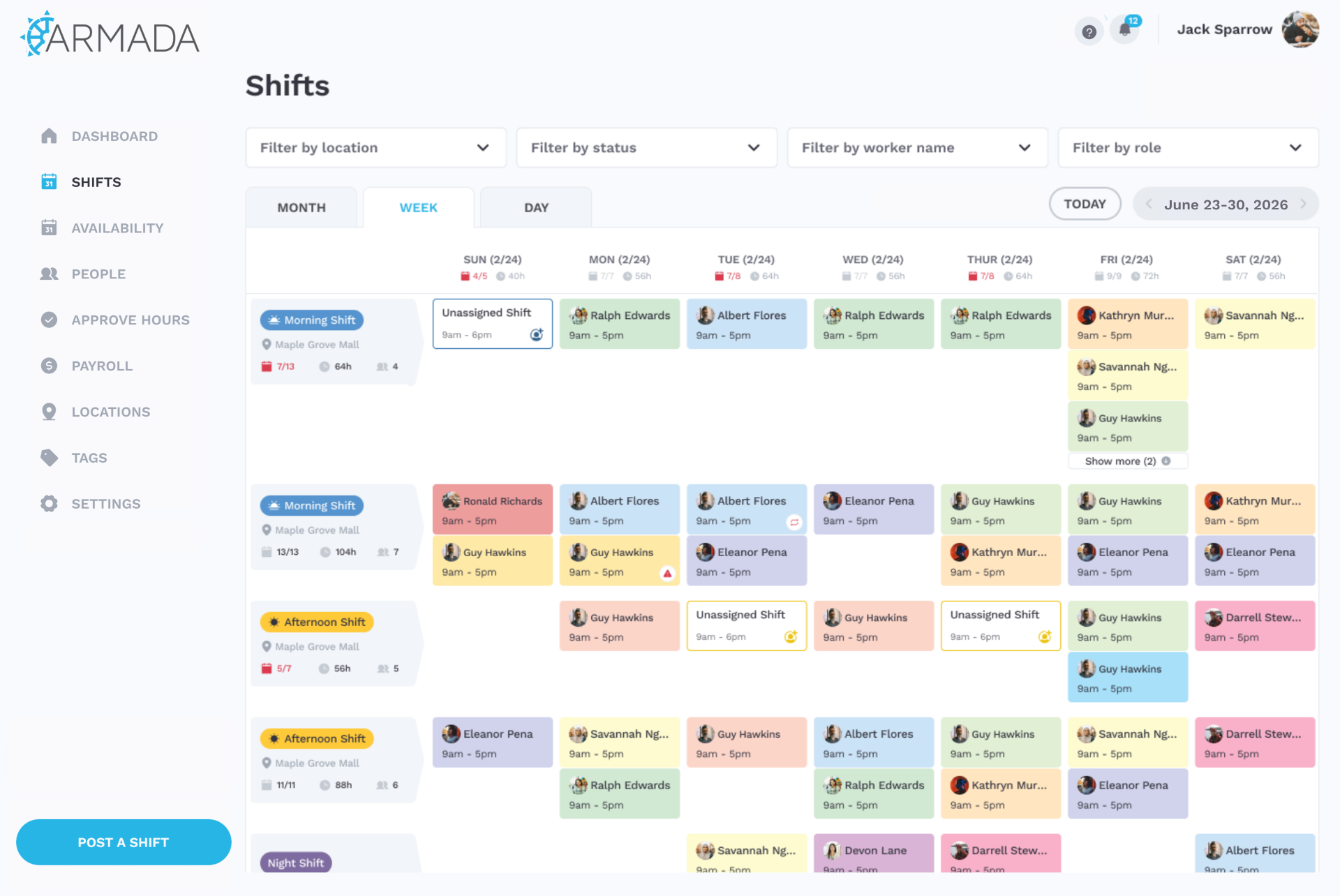
Drag and drop to build
Team notified instantly on publish
Open shifts claimed automatically
How it works
From signup to scheduled in under 10 minutes.
No training manual. No setup call. No hidden complexity. Three steps and your whole team is in one place.
Set up your locations or teams
Add the places your team works, or define groups for distributed and field-based teams. Then set up the roles people fill. Do it once, and every schedule builds from there.
“I had our locations and roles set up before my coffee was cold.”
— Maya R., café owner
Invite your team
Send invites by email. Your team downloads the app, sets their availability, and they're ready to be scheduled. No training required.
“Every single one of my crew was on the app the same day. No training needed.”
— Devin P., operations lead
Build and publish
Drag and drop shifts onto the calendar. Hit publish. Your whole team gets notified instantly. No reminder calls, no wall calendar, no chasing.
“Hit publish and the schedule was on every phone before I closed the laptop.”
— Priya S., store manager
No credit card required · Cancel anytime
The employee experience
Your team gets it on day one.
Employees download the app, see their shifts, and clock in with a photo. No training. No confusion. No “did you see the schedule?” texts.
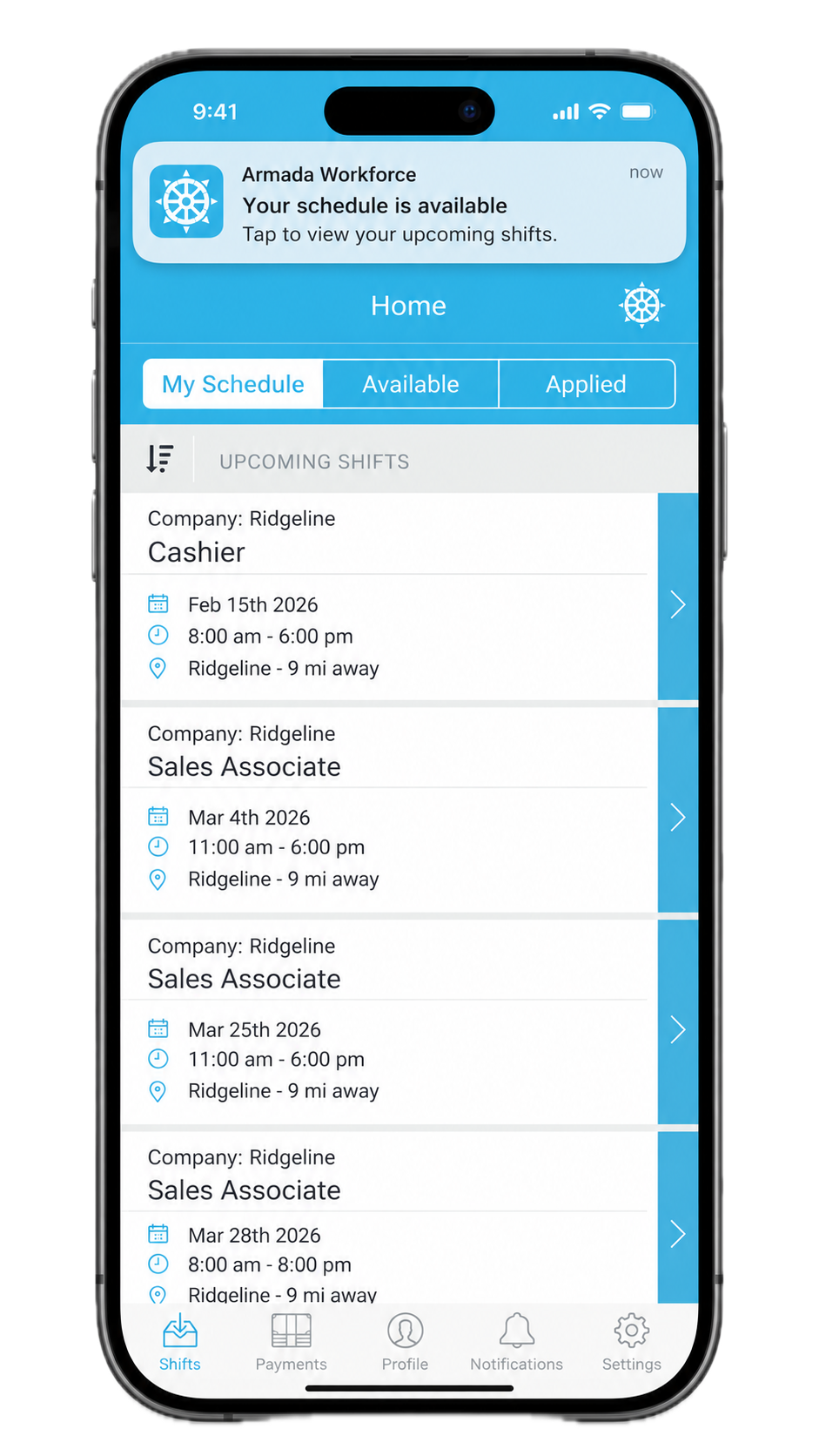


Free for all employees on iOS and Android.
Built for real teams
Powerful enough to run on. Simple enough for day one.
Everything you need to run your team. None of the bloat that makes other platforms a nightmare to set up.
One central view
Every shift, role, and location in one place. Your whole team sees the same schedule in real time.
Drag-and-drop scheduling
Build a full week in minutes. If you can use a calendar, you can use Armada.
Smart shift filling
Assign available employees or broadcast open shifts for them to claim. Gaps get filled without the back-and-forth.
Your team always knows
The moment you publish, everyone gets notified. No calls, no texts, no "I didn't see it."
Photo + GPS clock-in
Confirm employees are on-site with a photo and GPS stamp. Set a geofence so they can't clock in from the parking lot.
Built-in team chat
Message employees directly or broadcast to the whole team. No more scheduling over text threads.
Tasks with photo proof
Assign a work item with a due date and require a photo before it can be marked done. Anything past due auto-flags as Late. Proof the work happened, not just that someone showed up.
Overtime tracking
Set your weekly overtime start day, Sunday or Monday, to match how payroll runs. See OT building before it lands on an invoice.
Payroll-ready export
Export hours as a CSV when the pay period closes. No retyping timesheets into payroll.
Wage and wage history
Set a base wage plus role-specific rates, schedule a raise with a future effective date, and keep a complete history of every change.
Unfilled shift alerts
Armada checks every day at 5:00 PM ET for unfilled shifts in the next three days and tells you, plus a digest of pending swaps.
Availability with exceptions
Recurring weekly availability, plus dated exceptions and a holiday flag for the weeks that do not look like the others.
No credit card required · Cancel anytime
Who it's for
If you're scheduling people, you'll feel at home.
Armada works for any team with hourly or shift-based employees. Here's where we shine.

Scheduling app for restaurants
Built for the pace of a kitchen. Cover prep, service, and close across servers, line cooks, and hosts. Publish the week in minutes, fill last-minute call-outs from your phone, and stop chasing the group text.
- saved per week
- 5 hrs
- less schedule time
- 75%
- staff on the app
- 100%
saved per week
less schedule time
staff on the app
"We used to lose an hour every Sunday building the schedule and another hour all week chasing call-outs. Armada cut both to almost nothing."

Scheduling software for cleaning crews
One schedule for crews working different job sites every day. Assign teams, share the address and start time, and verify they showed up with photo and GPS clock-ins. No more morning phone trees.
- saved per week
- 8 hrs
- fewer 'where am I?' calls
- 90%
- crew using the app
- 24/24
saved per week
fewer 'where am I?' calls
crew using the app
"My crews bounce between six job sites a day. Now they open the app and know exactly where to be — and I can see they actually got there."

Employee scheduling for retail shops
Keep the floor covered without burning out your manager. Plan opens, mids, and closes, handle shift swaps from the app, and let staff claim open shifts when someone calls out sick.
- saved per week
- 4 hrs
- to fill an open shift
- <10 min
- staff active in app
- 21/22
saved per week
to fill an open shift
staff active in app
"Open shifts get claimed in minutes instead of me texting five people. My phone stopped buzzing on Saturday mornings."

Scheduling app for fitness studios
Run trainers, front desk, and class instructors across one or more studios. Match availability to class times, broadcast open coverage, and keep every location on the same page.
- saved per week
- 6 hrs
- double-bookings since launch
- 0
- instructors onboarded
- 30/30
saved per week
double-bookings since launch
instructors onboarded
"Two studios, 30 instructors, and zero double-bookings since we switched. The flat price was the cherry on top."
Flat pricing
Flat-rate employee scheduling software, not per-employee fees
Armada is flat-rate scheduling software built for shift-based teams. Free for up to 10 employees across your organization, then one price per location with unlimited employees, no per-seat fees, ever.
One flat price per location
On the paid plan you pay $25/month per location, team, or crew. Not per employee, not per shift, not per admin. Hire 5 people or 50 — your bill doesn't move. Under 10 employees? It's free.
No per-seat scheduling fees
Most employee scheduling software charges $2–$5 per user per month. On a 25-person team that's $50–$125/month on top of base fees. Armada is one line item.
Predictable as you grow
Add a second location for $25/month. That's it. No tier jumps, no "contact sales," no surprise invoices when you onboard a new hire.
Compare
Armada vs. typical scheduling tools
How Armada compares to per-seat scheduling apps like When I Work, Homebase, and 7shifts.
| Feature | Armada | Typical alternatives |
|---|---|---|
| Pricing model | Free up to 10 employees, then flat $25/mo per location | Per-employee fees |
| Employees included | Free: up to 10 organization-wide. Paid: unlimited. | Capped or metered |
| Setup time | Under 10 minutes | Onboarding call required |
| Mobile app for employees | Included (iOS + Android) | Often a paid add-on |
| Open shift claims | One tap from phone | Manager phone calls |
| Contract | Month-to-month, cancel anytime | Annual contracts common |
No credit card required · Cancel anytime
Contact us
Questions? We're here.
Send us a message and we'll get back to you within one business day.
FAQ
Quick answers.
If you have a question we haven't answered, just get in touch.
Is there really a free plan?
Yes. Up to 10 employees across your whole organization, on unlimited locations, free forever. No credit card, no trial clock. When you pass 10 employees you move to the paid plan at $25/month.
How much does Armada cost?
Armada is free forever for up to 10 employees across your whole organization. Past 10 employees, it's $25/month per location billed annually, or $35/month billed monthly, with unlimited employees and admins. Additional locations are $25/month each. There are no per-seat fees, setup fees, or contracts.
Is it really unlimited employees?
Unlimited employees and admins come with the paid plan. The Free plan includes up to 10 employees across your entire organization. On paid, we don't charge per-seat or per-user — you pay one flat rate per location, team, or crew, whether you have 10 employees or 100.
How does the 60-day free trial work?
You get full access to Armada for 60 days. No credit card required upfront. We'll send you a reminder before the trial ends so you can decide whether to keep going.
What if I have more than one location?
Your first location is included. Additional locations are $25/month each, and you can add them right inside the app whenever you're ready to grow.
What's the best scheduling app for small businesses?
For small shift-based businesses, the best scheduling app is one that's fast to set up, has a real mobile app for employees, and doesn't penalize you for hiring. Armada checks all three: under 10 minutes to first schedule, native iOS and Android apps, and free forever for up to 10 employees, then flat $25/month per location with unlimited employees.
How does Armada compare to When I Work, Homebase, or 7shifts?
Most competitors charge per-employee fees that grow with your team. Armada is free forever for up to 10 employees across your organization, and past that a single flat rate of $25/month per location with unlimited employees and admins. Setup is self-serve in about 10 minutes — no mandatory onboarding call — and employee mobile apps are included rather than sold as an add-on.
Does Armada work for restaurants, retail, and cleaning services?
Yes. Armada is built for any team with hourly or shift-based employees. It's used by restaurants and cafés, retail stores, cleaning and home-service crews, and fitness and wellness studios. Multi-role and multi-location scheduling are included by default.
Can employees swap shifts or claim open shifts?
Yes. Managers can post open shifts and qualified employees claim them right from the mobile app. Shift swaps go through the same one-tap flow with manager approval, so the schedule of record always stays accurate.
Does Armada send shift reminders to employees?
Yes. Employees get push notifications when schedules publish or change, plus reminders before each shift. That eliminates the 'did you see the schedule?' phone calls and group-text chaos.
What counts as a location?
A location is any group of people who share one schedule. That's usually a physical place like a store, restaurant, or studio. But it can also be a field team, a cleaning crew, a remote staff, or any distributed group that works together but doesn't share an address. If they're scheduled together, they're one location.
Is Armada really flat-rate, or are there hidden per-user fees?
Armada is genuinely flat-rate. The Free plan covers up to 10 employees across your entire organization at no cost. On the paid plan you pay $25/month per location (annual) or $35/month (monthly), and that includes unlimited employees and unlimited admins. There are no per-seat fees, no per-shift fees, no setup fees, and no charges for the employee mobile apps. The only thing that adds to your bill is adding more locations, at $25/month each.
Will my team actually use this?
Yes. Employees get a clean mobile app where they can see their shifts, set availability, and claim open spots in seconds. Most teams say it's easier than the group text they were using before.
How hard is it to cancel?
Easy. Cancel anytime right from your account settings. No phone calls, no retention dance, no hoops.
How long does setup take?
Most teams are up and running in under 10 minutes. Add your locations and roles, invite your team by email, and start building shifts. No setup call required.

Get your team off the group text.
Try Armada free for 60 days. No card. No commitment. Just simpler scheduling.
Start your 60-day free trial10 employees or fewer? Start on the free plan.